


Payment Solutions at Cosmo Casino
Cosmo Casino brings deposits, withdrawals and payment account management together in one secure Cashier. The options displayed there are matched to your account, location and selected currency, so the Cashier is the most reliable place to check current methods, limits, fees and availability before confirming a transaction.
Secure Payments and Account Verification
Payment security starts with accurate account details. Use only a payment method held in your own name and make sure the information on your Cosmo Casino profile matches the details registered with your bank, card provider or e-wallet. A mismatch can cause a deposit to be declined or delay a withdrawal.
Cosmo Casino may request proof of identity, address or ownership of a payment method before releasing a withdrawal. Clear documents and up-to-date account information help the review proceed without unnecessary delays. Never share your password, card PIN or one-time security code with anyone. If you need help with a transaction or verification request, contact the Casino Support Centre.
Deposit Options for New Zealand Players
The Cosmo Casino Cashier can present major credit and debit cards, bank transfer services, prepaid vouchers and established e-wallets. The exact selection is personalised and may change when a provider updates its regional coverage or your bank applies its own transaction rules.
| Payment Category | Typical Use | What to Check |
|---|---|---|
| Credit or debit card | Direct deposit from an eligible card | Card eligibility, issuer approval and the limit shown in the Cashier |
| E-wallet | Deposit through a supported digital wallet | Regional availability and whether the wallet can also receive withdrawals |
| Bank transfer | Transfer from a bank account in your name | Bank details, fees and the expected settlement time |
| Prepaid voucher | Deposit without entering bank account details at the casino | Voucher balance, deposit-only restrictions and regional support |
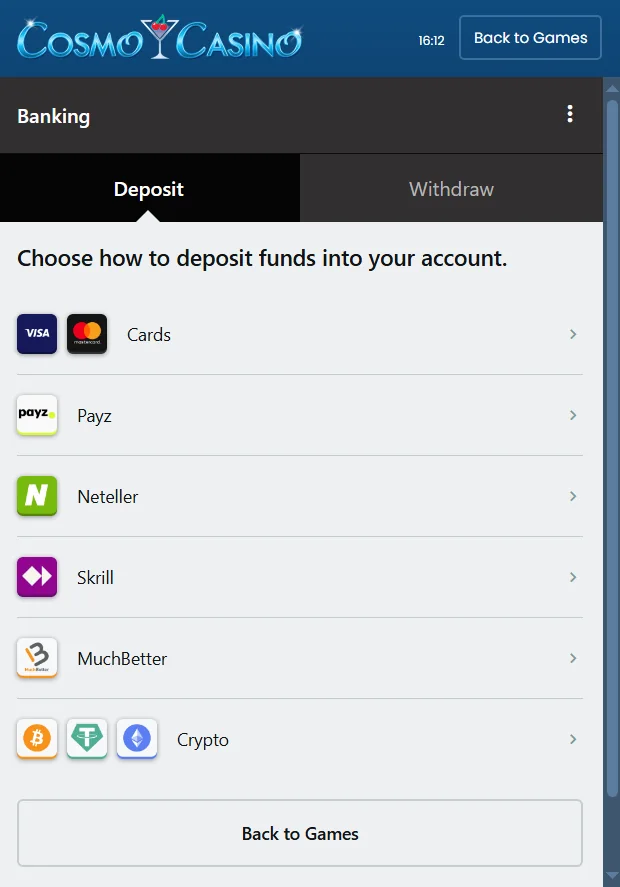
How to Deposit by Credit or Debit Card
Sign in to your Cosmo Casino account, open the Cashier and remain on the deposit screen. Choose an available card option, enter the requested card and billing details, select the amount and review the information before confirming. Your card issuer may ask you to complete an additional authentication step. If the payment is declined, check that the billing address is correct and ask your issuer whether it permits the transaction.
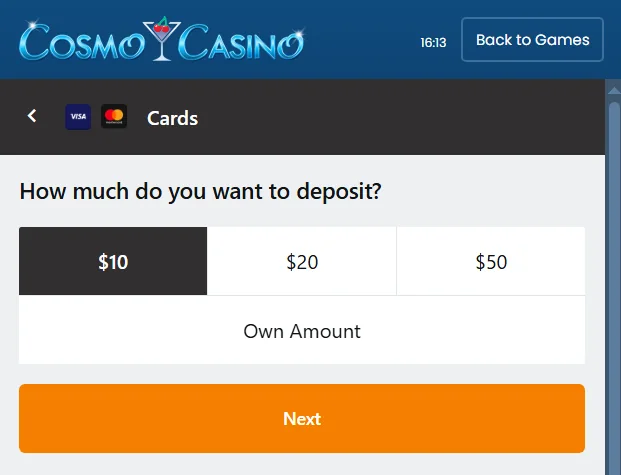
How to Deposit with an E-wallet
Open the deposit screen and select one of the e-wallets offered for your account. Enter the amount, continue to the provider and approve the payment using your own wallet credentials. The name and personal information linked to the wallet should correspond with your Cosmo Casino account. Only the e-wallets visible in your Cashier are currently supported for you.
How to Deposit by Bank Transfer
Select bank transfer in the Cashier and follow the displayed instructions carefully. Use a bank account registered in your name, copy the beneficiary and reference details exactly, and keep the transfer confirmation until the funds appear in your casino balance. Unlike many card and e-wallet deposits, a bank transfer can take several working days to settle.
Using a Prepaid Voucher
If a prepaid voucher is offered in your Cashier, select it from the deposit list and enter the requested voucher details. Check the available balance before confirming the payment. Prepaid products are often designed for deposits rather than withdrawals, so you may need to nominate another eligible method when cashing out.
Why a Deposit May Be Declined
A declined payment does not always indicate a problem with your Cosmo Casino account. Common causes include incorrect billing information, an expired card, insufficient funds, a provider limit, an interrupted connection or a bank declining a gambling-related transaction. Do not submit repeated attempts without checking the details first. Review any message in the Cashier and contact the Casino Support Centre if the reason is unclear.
Withdrawals for New Zealand Players
To request a withdrawal, sign in, open the Cashier and select the withdrawal tab. Enter the amount, choose an eligible payment route and provide any details requested for that method. Where possible, recent deposits are returned to their original source. Any remaining winnings are sent through your nominated Preferred Method of Payment.
| Withdrawal Stage | Published General Timeframe | Important Detail |
|---|---|---|
| Pending review | 48 hours | The request can be reversed until it has been fully processed |
| E-wallet delivery | 1 to 3 working days | Applies after casino processing and only to an eligible wallet |
| Card delivery | About 3 working days | Card refunds and payouts depend on processor support |
| Direct bank transfer | 6 to 10 working days | Intermediary banks and local clearing can affect arrival time |
| First withdrawal by a method | Up to 5 to 7 additional working days | Extra identity or payment ownership checks may be required |
These are general processing estimates published by Cosmo Casino and are not a guarantee of the exact arrival time. Weekends, public holidays, verification, payment provider checks and your bank’s posting schedule can all affect the final timeframe. The limits, charges and methods displayed in your Cashier at the time of the request take priority.
Choosing a Preferred Method of Payment
Your Preferred Method of Payment is the route used for winnings that cannot be returned to a recent deposit source. In the withdrawal area, choose an available method and complete every required field. For a bank transfer, this may include the bank address, account number and other routing information. Check the details carefully because incomplete or incorrect information can result in rejection or delay.
What to Do Before Requesting a Withdrawal
- Confirm that your name, residential address and date of birth are accurate.
- Use a payment account that belongs to you.
- Check the current minimum, maximum and any fee shown in the Cashier.
- Make sure any applicable bonus conditions have been completed.
- Prepare clear identity, address and payment ownership documents if requested.
Reversing a Pending Withdrawal
A withdrawal normally remains pending for 48 hours. During that period, the Cashier may allow you to reverse the request and return the money to your playable balance. Reversal is no longer available after processing has been completed. Remember that cancelling a cashout puts those funds back at risk, so consider your decision carefully and use the responsible gambling tools available in your account.
Current Payment Information Comes from the Cashier
Payment services can differ between players and may be added, removed or temporarily unavailable. For that reason, Cosmo Casino does not treat a static list as a substitute for the options shown after sign-in. Before every deposit or withdrawal, review the method, amount limits, currency, fee and estimated timeframe in the Cashier. For account-specific assistance, visit the Casino Support Centre.
Withdrawal Limits
Under our Terms and Conditions, a weekly withdrawal limit may apply when winnings substantially exceed the player’s total purchases across Casino Rewards partner casinos. Payment-method limits can also apply. Review the applicable limit and currency in the withdrawal rules and Cashier before requesting a payment.