


Play Anywhere on CosmoCasino App for Mobile
Android and iOS users can easily access Cosmo Casino thanks to it being a mobile-friendly online establishment. You get access to the same features as you would on your desktop, without needing to download it from digital marketplaces. The text below will walk you through the steps of setting up the mobile version, logging in, and playing.
How to Get Started?
To use the Progressive Web App (PWA), open casino-cosmo.com in your mobile browser and add it to your home screen. This provides an app-style way to open the casino without a store download. Apps may also be available through Google Play or the App Store in markets where the brand holds the relevant local licence; store availability depends on the market.

Android Installation
The Android version is perfect for you if you wish to get to the casino quickly without downloading heavy apps or updating them manually all the time. This is how to install it:
- Open casino-cosmo.com using Google Chrome on your Android device.
- Click the menu button on your browser and choose the option “Add to Home screen” or “Install app.”
- Accept the installation prompt.
- Tap on the new icon that appeared on your home screen to run the PWA.
iOS Installation
Apple device users value the ability to put the Cosmo Casino PWA along with other applications on the home screen so that they don’t have to look for the site every time they want to play the preferred games. The set-up procedure is as follows:
- Open casino-cosmo.com using Safari on your iPhone or iPad.
- Find the Share button at the bottom of your screen.
- Choose Add to Home Screen and tap Add.
- Open the Cosmo Casino icon from your home screen.
Troubleshooting
In case you experience difficulties in installing the CosmoCasino PWA, there usually are only a few simple steps needed to fix them:
- Make sure that you are using a compatible browser: Google Chrome for Android devices and Safari for iPhones. The installation button may be absent in other applications.
- Ensure that your browser is up to date, as older versions might have problems with installing PWA applications.
- If you cannot find the “Add to Home Screen” or “Install app” button, refresh the page and make sure that you have opened the official website of Cosmo Casino, not any third-party link.
- A stable Internet connection is essential throughout the whole process of installation. So, you need to make sure you’re using a reliable web connection.
- In case you have already installed the PWA application, you should delete the old shortcut before proceeding with the installation.
- Sometimes a restart of your browser or device may help you deal with the issue. In case it does not help, you need to clear the cache and cookies of your browser and perform the same procedure.
Cosmo Casino Mobile Login Process
The process of logging into the Cosmic Casino when on mobile is very fast because there is no need to create a new profile for the PWA. Your current login credentials will be recognised regardless of the device used. This allows Kiwi players to conveniently swap devices to potentially prolong their stay. Here’s how you can sign in on Android or iOS:
- Tap on the Cosmo Casino mobile app icon on your home screen.
- Put in your username and password on the login screen.
- Perform additional verification and check “keep me logged in” if needed.
- Access your gambling account.
Mobile App Interface
Cosmo Casino’s mobile design allows easy access to the features that users interact with most often.
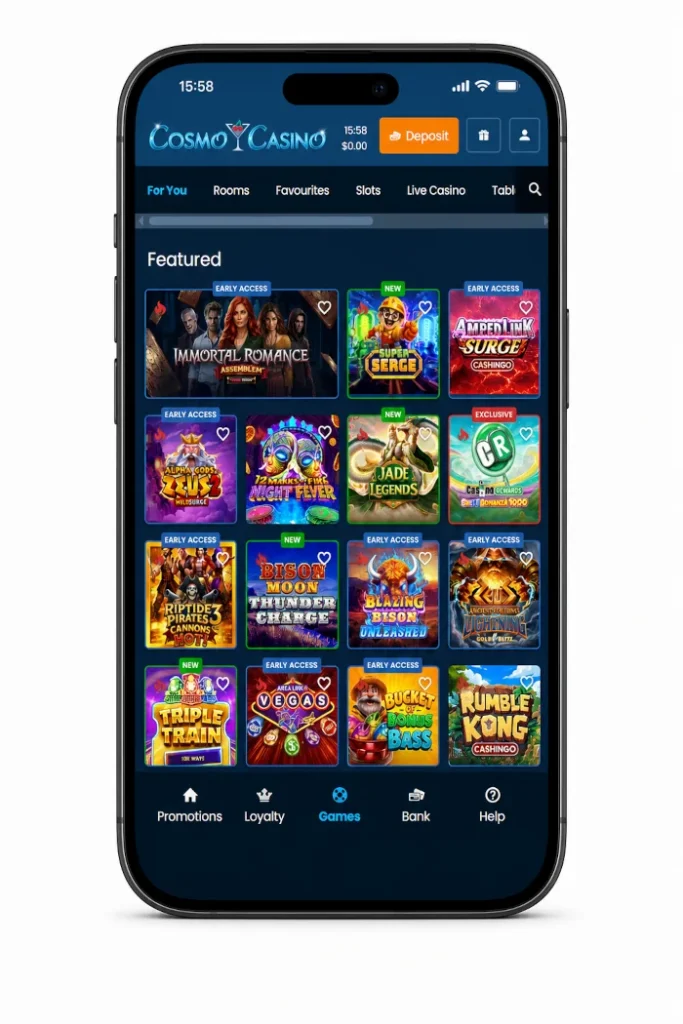
At the very top of the mobile interface, users will find a Cosmo Casino logo, time, balance information, and an orange Deposit button. Access to gifts or promos and the player account can be found separately. Below, a horizontal navigation bar will allow switching between game tabs such as For You, Rooms, Favourites, Slots, and Live. You can also use the search icon to quickly find games.
Games are usually presented on the main lobby page in three columns, with big artwork of them, allowing easy browsing even on smaller screens. A dark navigation bar with buttons Promotions, Loyalty, Games, Bank, and Help appears in the bottom part of the screen. It’s always accessible no matter what part of the casino is currently opened.
CosmoCasino Games on Mobile
Each individual game was optimised to be used in portrait mode and makes use of the whole screen to give maximum playing space. In mobile slots, the interface typically ensures that the spin button is located right in the centre of the bottom panel, with the autoplay, quick spin, menu, settings and more options arranged around that button. This is thumb-first game design that mobile players typically appreciate.
Your funds and bet amount will always be available during the game, while the deposit button and the “Back to Games” option are placed in the top bar, so you can move back to the casino lobby without having to quit the game.
PWA vs Mobile Site
Progressive Cosmo Casino app and the regular mobile website version provide you with the same access to your account, games, payment options, and bonuses. The distinctions are in how you boot them up and their general performance.
If you use the casino regularly from your phone or tablet, the PWA can be a faster solution for accessing the games and bonuses that you like:
| Feature | PWA | Mobile Site |
| Access | Launched via an icon on the home screen in one tap | Entails using your web browser and visiting the website every time |
| Interface | Provides a full-screen view that is similar to the native app | Navigates via your web browser using a common web interface |
| Ease of use | More convenient for regular playing because it opens up quickly | More convenient for rare play without the need for any set-up |
| Installation | Entails one-time installation via the web browser in less than one minute | Does not require any installation |
| Updating | Will always access the latest version automatically | Will also load the latest version every time you visit |
| Casino Functions | Entails all the functions of the casino, including games, promotions, banking, etc | Includes the same casino functions as well |
Mobile Access in New Zealand and Ireland
Players in New Zealand and Ireland can use the same browser installation steps described above. Your account currency and the games, payment methods and promotions available to you depend on your country of residence and account settings. Choose New Zealand or Ireland for regional information.
The home-screen shortcut opens casino-cosmo.com from your mobile browser. Availability of a separate app in an app store depends on the market. Check the listing and its publisher before installing any app.